iOS App Development requires mastering the Apple ecosystem, Swift programming, and Xcode workflows to build high-performance software for iPhone users. If you are planning a new product, understanding technical frameworks, realistic timelines, and budgeting helps teams avoid costly launch delays. Our mobile app development services guide founders through every phase from initial architecture to App Store submission.Understanding the iOS Development LandscapeiOS app development is the process of creating native software applications specifically for Apple’s operating systems. This includes applications for iPhones, iPads, Apple Watches, Apple TVs, and the Apple Vision Pro. To begin, developers need a Mac computer, as it hosts the essential Xcode Integrated Development Environment (IDE). Participation in the Apple Developer Program, which involves an annual fee, is also mandatory for distributing apps on the App Store. This native approach differs from cross-platform development, which uses a single codebase for multiple operating systems.
What is iOS app development?
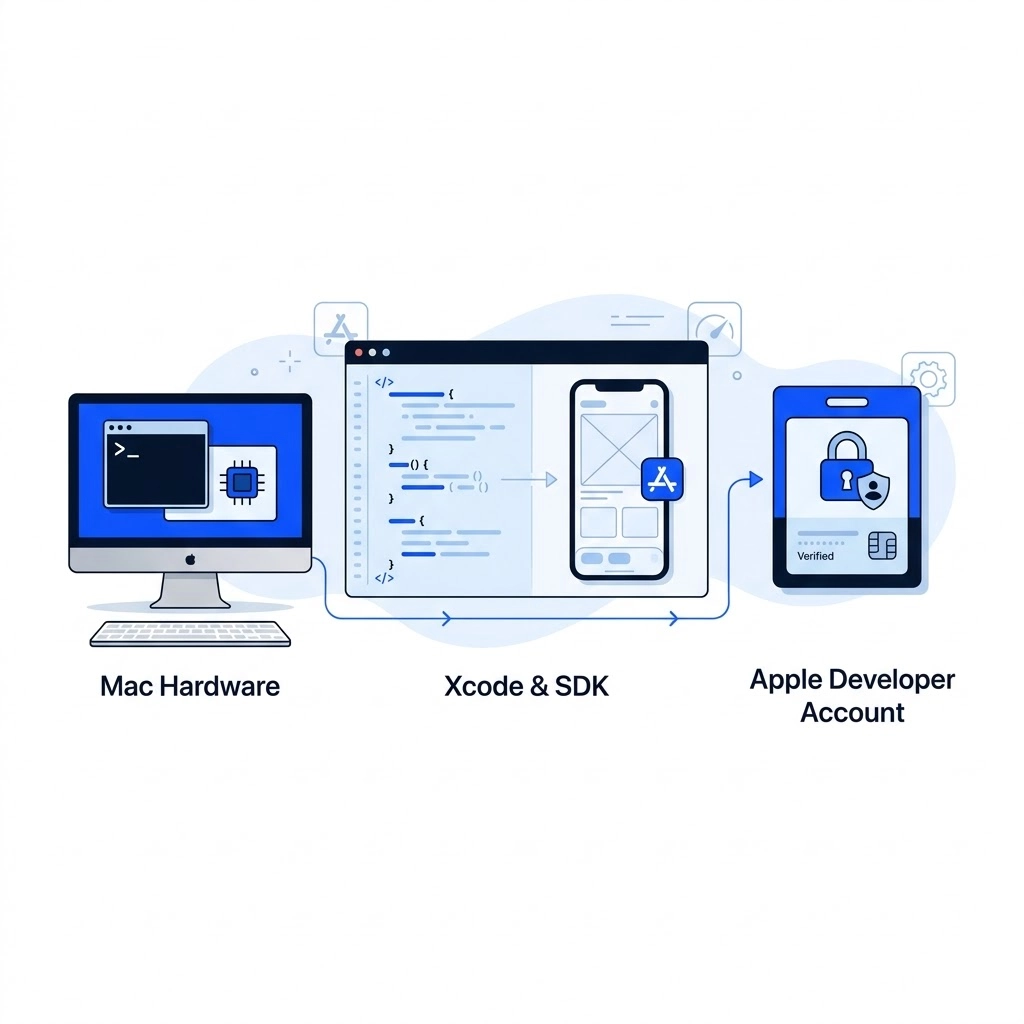
Building native applications for the Apple ecosystem requires specific foundational infrastructure and tools. Understanding these requirements ensures product teams scope their technical architecture correctly from day one.
- Mac computer requirement: Essential hardware running macOS to host the official development toolchain.
- Xcode IDE: The primary Integrated Development Environment provided by Apple for writing, testing, and debugging code.
- Apple Developer Program: A paid annual membership required to access beta software, test on physical devices, and submit apps to the App Store.
- Native distinction: Building strictly with native tools ensures direct access to platform APIs, unlike cross-platform frameworks that rely on abstract bridges.
The iOS advantage and business ecosystem
The iOS ecosystem offers distinct commercial advantages for businesses looking to scale digital products. According to Backlinko data, the Apple App Store commands approximately 58% to 59% of the mobile operating system and device market share within the United States. Users on this platform consistently exhibit higher spending power and strong application engagement.
Globally, the Apple App Store reached $117.6 billion in consumer spending.
Furthermore, Apple’s operating systems boast rapid adoption rates; by June 2026, according to a Rentamac survey report, iOS 26 was running on 79% of all active iPhones.
The platform combines these adoption metrics with advanced system security, strict data privacy controls, and hardware consistency.
These combined strengths simplify optimization efforts for engineering teams delivering professional mobile app development services.
Core Technologies and Programming Languages
Building an iOS application relies on a specific set of programming languages and development tools provided by Apple. Understanding these core components is crucial for efficient and effective app creation. The primary language for modern iOS development is Swift, known for its safety and speed. For maintaining older applications, Objective-C remains relevant.
The development environment itself is centered around Xcode, Apple’s integrated development environment (IDE). Xcode offers a comprehensive suite of tools for coding, debugging, interface design, and performance analysis. Beyond the IDE, developers leverage various frameworks to build different aspects of an app. These frameworks provide pre-built functionalities, saving development time and ensuring adherence to Apple’s standards.
Choosing your programming language
When embarking on iOS app development, selecting the right programming language is a foundational decision. For new projects, Swift is the modern, preferred choice. It offers significant advantages in speed, safety, and expressiveness, making code easier to write and maintain. Swift’s features like optionals and strong type inference help prevent common programming errors.
For projects requiring maintenance of existing codebases, Objective-C is still encountered. While it served as the primary language for many years, its syntax is more verbose than Swift’s. Modern development overwhelmingly favors Swift due to its enhanced safety features and cleaner syntax.
Essential iOS development tools and frameworks
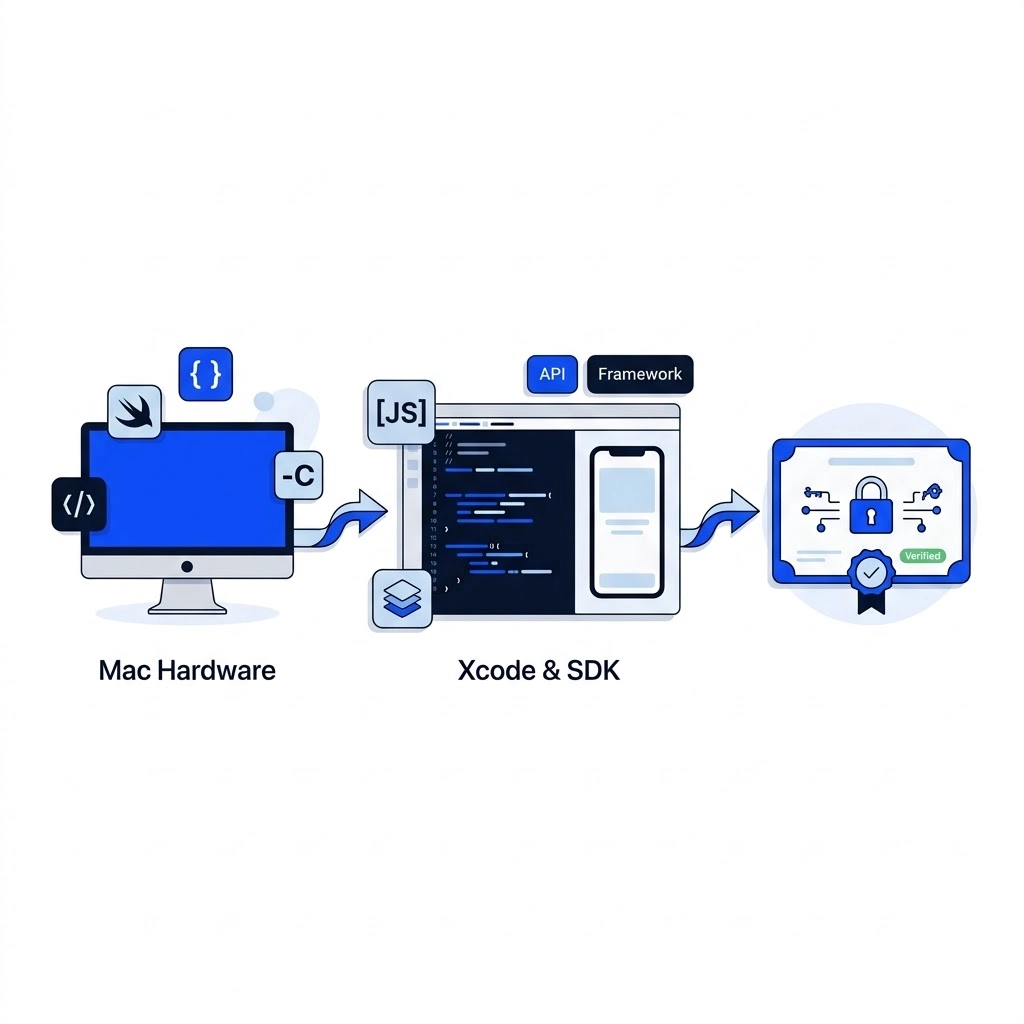
The Xcode IDE serves as the central hub for all iOS development activities. It integrates a powerful code editor, Interface Builder for visual UI design, and a robust debugging console. Xcode streamlines the entire development workflow, from writing code to preparing the app for distribution.
Beyond Xcode, Apple provides a rich ecosystem of frameworks that power iOS applications. SwiftUI is Apple’s modern, declarative UI framework, enabling developers to build interfaces that adapt across devices with less code. For more extensive customization and compatibility with older projects, the UIKit framework remains a mature and powerful option.
For managing data locally, Core Data offers a robust framework for object graph management and persistence. Integrating artificial intelligence is made accessible through Core ML, allowing apps to run machine learning models directly on the device. Augmented reality experiences are brought to life using ARKit. Furthermore, WidgetKit enables the creation of interactive home screen widgets, enhancing user engagement.
| Technology | Primary Purpose | Key Benefit |
|---|---|---|
| Swift | Modern app logic and features | Enhanced speed and safety |
| Objective-C | Legacy software maintenance | Compatibility with older systems |
| Xcode IDE | Comprehensive development environment | Centralized coding and debugging |
| SwiftUI | Modern user interface design | Declarative and adaptive layouts |
| Core Data | Local data persistence | Efficient object graph management |
The vast iOS developer community, numbering over 60 million registered developers globally, underscores the platform’s significance. This large ecosystem ensures ample resources and support for developers. Furthermore, the widespread adoption of the latest operating system, with iOS 17 running on 79% of active iPhones by June 2026, means developers can confidently target modern features and APIs. This high adoption rate minimizes concerns about OS fragmentation for new development efforts.
Native vs. Cross-Platform Development Approaches
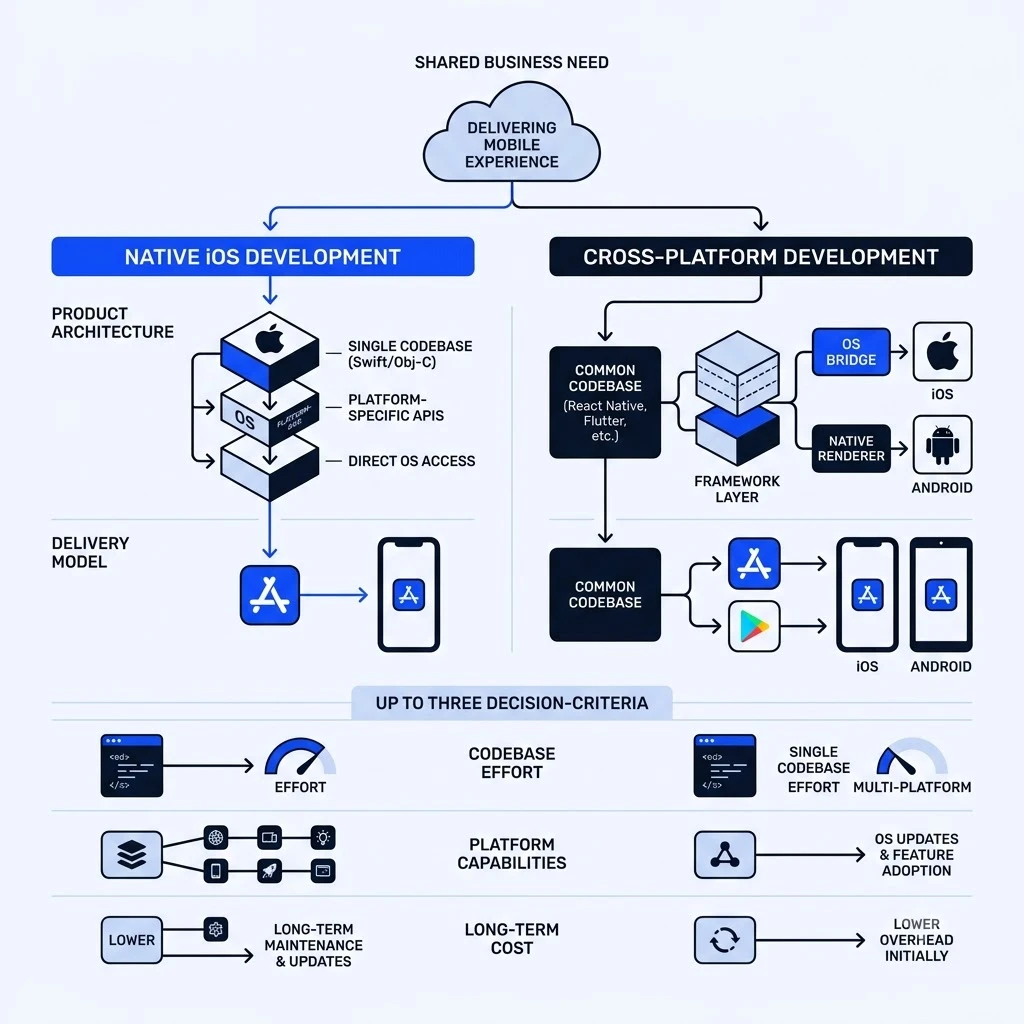
Choosing between native and cross-platform development significantly impacts an app’s performance, cost, and development timeline. Native development builds apps specifically for one operating system, while cross-platform approaches use a single codebase for multiple platforms. This fundamental decision guides the entire project strategy.
Native iOS Development
Native iOS development involves creating applications exclusively for Apple’s ecosystem. Developers use Swift or Objective-C, along with Apple’s Software Development Kit (SDK). This approach ensures the app fully leverages the platform’s capabilities.
- Definition: Building apps specifically for iOS using Swift/Objective-C and Apple’s SDKs.
- Pros: Optimal performance, full access to device hardware and the latest features, best user experience, and strict adherence to Apple’s Human Interface Guidelines.
- Cons: Higher initial development cost and time compared to cross-platform, requiring a separate codebase for Android if needed.
Cross-Platform Development
Cross-platform development utilizes frameworks like Flutter or React Native. These allow a single codebase to function across both iOS and Android. This method can accelerate time-to-market and reduce initial investment.
- Definition: Using frameworks like Flutter or React Native to build apps for multiple platforms from a single codebase.
- Pros: Faster development cycles and reduced overall cost due to a single codebase for iOS and Android.
- Cons: Potential performance limitations compared to native apps, delayed access to new OS features, and the possibility of not fully matching the native look-and-feel.
| Approach | Primary Technology | Performance | Time-to-Market | Cost Efficiency | Hardware Access |
|---|---|---|---|---|---|
| Native iOS | Swift, Objective-C, SDKs | Maximum speed | Slower | Higher initial budget | Complete access |
| React Native | JavaScript, Native bridges | High performance | Moderate | Moderate savings | Near complete |
| Flutter | Dart, Skia rendering | High performance | Fast | High savings | Good access |
| Hybrid / Web | HTML, CSS, JavaScript | Baseline speed | Fastest | Lowest initial cost | Restricted |
The choice between these approaches depends on project priorities. For instance, the Apple App Store generated approximately $90.6 billion in revenue in 2025, highlighting the significant market potential for well-executed iOS apps. While hourly rates for iOS development in the United States can range from $60 to $120, the long-term benefits of a native app, such as superior performance and user experience, often justify the initial investment for feature-rich applications. Our mobile app development services at Enosta focus on creating high-performance iOS and Android applications, whether native or cross-platform, designed for usability and growth.
The iOS App Development Lifecycle: A Step-by-Step Process
Building a successful iOS app involves a structured, multi-stage process. This lifecycle ensures that an app is not only technically sound but also aligns with business objectives and user needs from conception to post-launch. Each phase builds upon the previous one, guiding the project toward a polished and market-ready product.
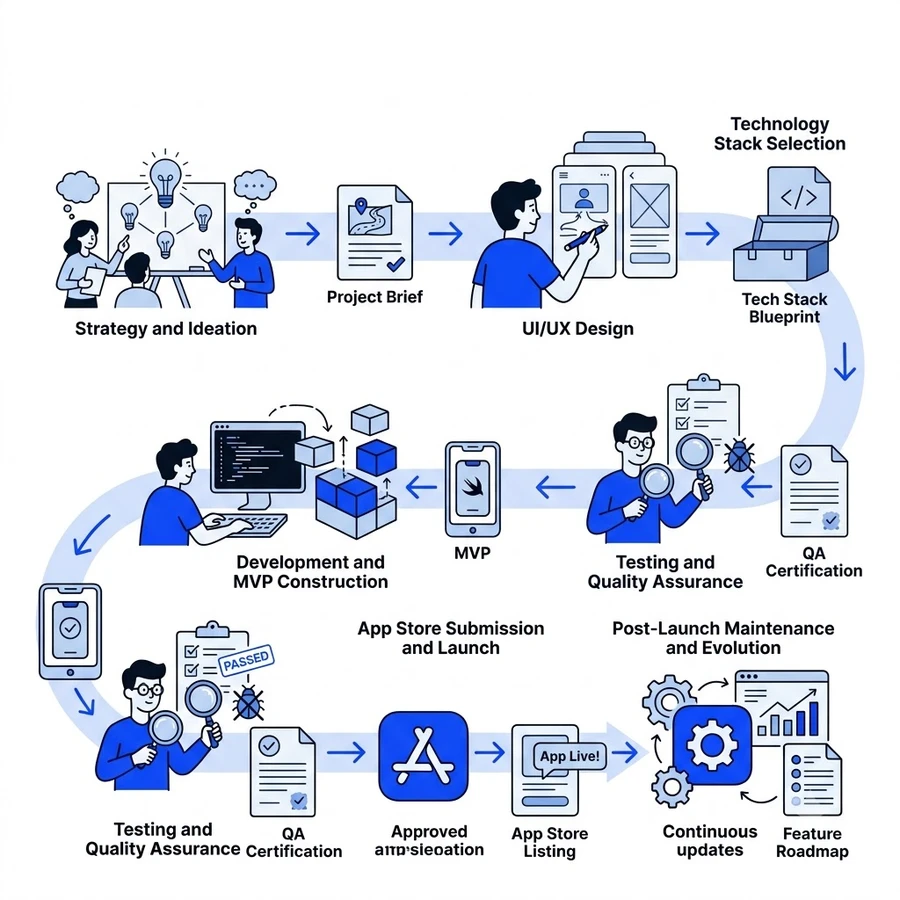
Stage 1: Strategy and ideation
This initial phase defines the app’s core purpose and market viability. It begins with goals formulation to establish clear business metrics and the specific problem the app aims to solve. Thorough market research and competitor analysis are crucial to identify opportunities and potential challenges. Understanding the target audience’s needs, behaviors, and pain points informs feature prioritization. Based on this research, a comprehensive product roadmap is formulated, outlining the app’s evolution and key milestones.
Stage 2: UI/UX design
With a clear strategy, the focus shifts to user experience and interface design. This stage involves creating detailed wireframing to map out the app’s navigation and functionality. High-fidelity mockups and interactive prototypes are then developed to visualize the final product. Adhering to Apple Human Interface Guidelines is paramount for creating an intuitive and familiar user experience within the Apple ecosystem. User-centric design principles ensure that every design decision prioritizes ease of use and engagement.
Stage 3: Technology stack selection
Choosing the right technology stack is critical for the app’s performance, scalability, and maintainability. Developers must evaluate platform approaches based on performance needs, budget constraints, and time-to-market goals.
| Approach | Core Technologies | Best Use Case |
|---|---|---|
| Native iOS | Swift, SwiftUI, UIKit | High-performance apps leveraging hardware features |
| Cross-Platform | React Native, Flutter | Budget-conscious MVPs targeting iOS and Android simultaneously |
| Hybrid | Web views, Apache Cordova | Simple content-driven apps with minimal native interaction |
Selecting appropriate programming languages, frameworks, and third-party libraries is essential. Planning the backend infrastructure, including databases and API integrations, also occurs during this stage.
Stage 4: Development and MVP construction
This is where the app is brought to life through structured coding. The development environment is set up using the Xcode IDE and an Apple Developer Account. The Minimum Viable Product (MVP) is built, focusing on core features that deliver essential value to users. Implementing clean code architecture, such as Model-View-Controller or Model-View-ViewModel, ensures the codebase is organized and maintainable. Necessary APIs and third-party services are integrated to support the app’s functionality.
Stage 5: Testing and quality assurance
Rigorous testing is vital to ensure a stable and high-quality app before public release. This stage includes local unit testing and UI testing via Xcode to catch regressions early. Beta distribution utilizes TestFlight for internal team validation and external user feedback loops. Performance profiling with Xcode Instruments helps identify and fix memory leaks and optimize for smooth 60 FPS rendering. Crucially, the app must be tested across various iOS versions and device screen sizes to ensure broad compatibility.
Stage 6: App Store submission and launch
Preparing for the App Store involves crafting compelling app metadata, screenshots, and descriptions that highlight the app’s value. The application binary is archived and uploaded via Xcode to App Store Connect. Developers must carefully navigate the App Store Review Guidelines to ensure compliance. Once submitted, the app undergoes a review process before it can be released to the public.
Stage 7: Post-launch maintenance and evolution
The app development journey doesn’t end at launch. Continuous monitoring of app performance and user feedback is essential. Regular updates are released to fix bugs, introduce new features, and improve user experience. Adapting to new iOS versions and platform changes ensures the app remains current and leverages the latest capabilities. This ongoing process of mobile app engineering, supported by continuous integration for iOS, is key to long-term success.
Testing and Quality Assurance for iOS Apps
Ensuring a robust and error-free application is paramount for user satisfaction and app store success. This section details the critical testing phases and methodologies essential for high-quality iOS app development.
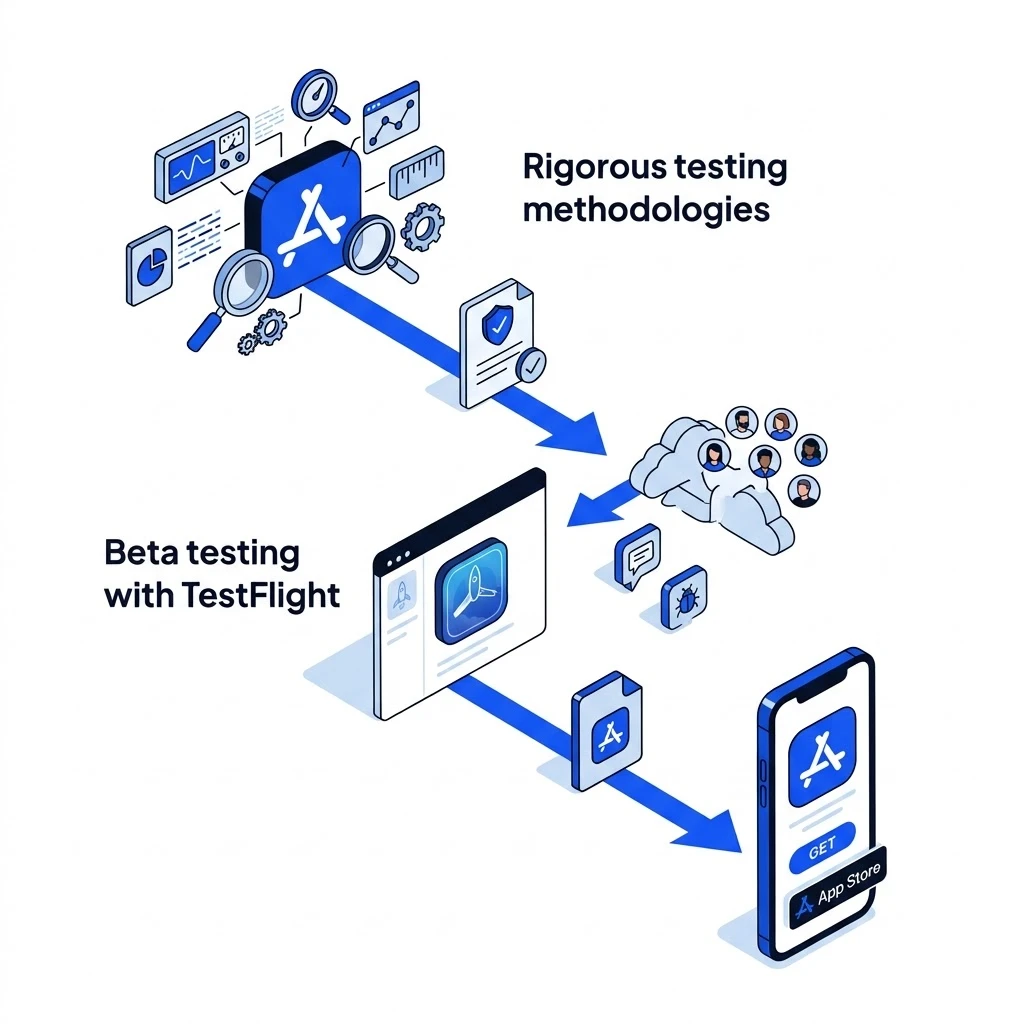
Rigorous testing methodologies
Effective iOS app development relies on a multi-layered testing approach. This begins with unit testing, where individual code components are verified in isolation to ensure they function as expected. Following this, integration testing confirms that different modules and services work together seamlessly. UI testing automates user interactions within the application’s interface, simulating real user behavior to catch interface-related bugs. Performance is also crucial; performance testing, often conducted using Xcode Instruments, profiles the app for speed, efficiency, and resource consumption, ensuring it meets benchmarks like 60 frames per second rendering and efficient memory usage.
Beta testing with TestFlight
Before a public launch, distributing pre-release builds is vital. Apple’s TestFlight platform facilitates this process efficiently. It allows developers to send builds to internal teams for initial review and feedback. Furthermore, TestFlight supports inviting external beta testers, up to 10,000 users, to experience the app in real-world conditions. This extensive beta testing phase helps identify bugs, usability issues, and gather valuable feedback for iteration. Iterating based on this real-world usage is key to refining the app before its official release.
Navigating App Store Submission and Guidelines
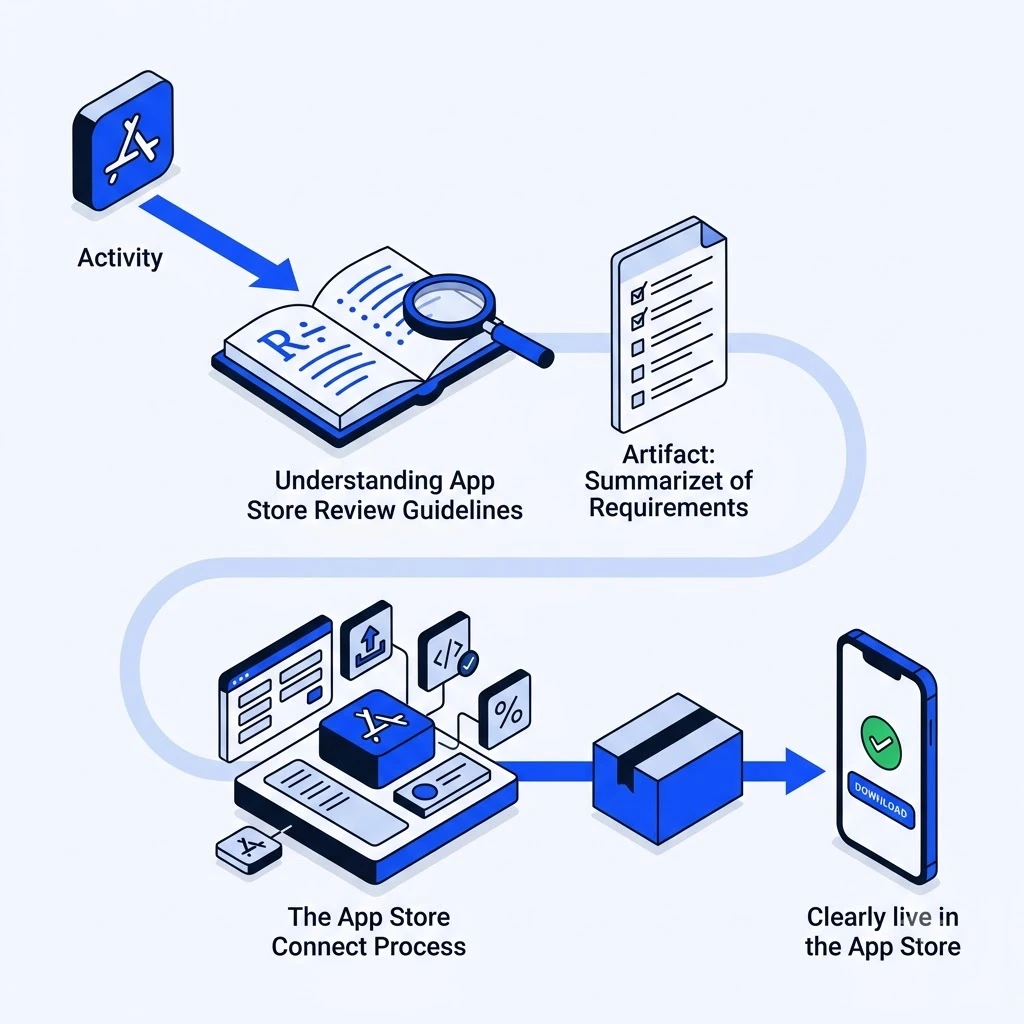
Successfully launching an app requires understanding and adhering to Apple’s strict policies. This involves navigating the App Store Review Guidelines and the App Store Connect platform.
Understanding App Store Review Guidelines
Apple’s App Store Review Guidelines cover critical areas like functionality, design, business practices, privacy, and legal compliance. Apps are meticulously reviewed to ensure they meet these standards. Common reasons for rejection include unexpected crashes, incomplete features, misleading metadata, and violations of user privacy. Adhering to these guidelines from the outset streamlines the submission process.
The App Store Connect Process
The App Store Connect platform is your central hub for managing your app. It begins with creating an Apple Developer account. You then use Xcode to archive your app and upload the build. Within App Store Connect, you configure essential details such as app metadata, pricing tiers, and privacy disclosures. It’s also important to understand the context of Apple’s commission structure, which typically involves a 30% fee on in-app purchases and subscriptions.
Cost Factors and Budgeting for iOS App Development
Understanding the financial investment required for iOS app development is essential for effective project planning and execution. Several key factors influence the overall cost, making it crucial to assess each element thoroughly. These include the complexity of the app, the specific features you want to implement, and the intricacy of the UI/UX design.
Backend infrastructure and any necessary third-party integrations also play a significant role. The choice between native iOS development using Swift or Objective-C versus cross-platform approaches like React Native or Flutter can impact both cost and timeline. Furthermore, the location and experience level of your development team are major determinants of pricing.
Factors influencing development cost
The scope of your iOS application directly correlates with its development cost. A simple app with basic functionality will naturally be less expensive than a feature-rich application requiring complex algorithms or extensive integrations. For instance, incorporating features like real-time data synchronization, advanced analytics, or augmented reality capabilities will increase development hours.
UI/UX design intricacy is another critical cost driver. While Apple’s Human Interface Guidelines provide a solid foundation, creating a unique, engaging, and intuitive user experience often demands specialized design talent and iterative prototyping. Backend infrastructure, including server setup, database management, and API development, adds to the expense, especially for apps requiring robust scalability and security. Integrating third-party services, such as payment gateways, social media logins, or mapping services, also incurs development and potential subscription costs.
Regional cost benchmarks
Development costs can vary significantly based on geographic location. In the United States, the cost to develop an iOS app typically ranges from $60,000 to $250,000 for standard applications. Complex enterprise solutions can easily surpass $400,000. Hourly rates for iOS app development in the US average between $60 and $120.
Canadian development rates are comparable, often falling between $90 and $120 per hour. European software development agencies generally offer more competitive pricing, with hourly rates spanning $35 to $55 for standard services. Specialized senior engineering roles in any region will command higher rates.
Optimizing development costs
To manage the cost to develop an iOS app effectively, strategic prioritization is key. Focusing on essential features for a Minimum Viable Product (MVP) allows for an initial launch and subsequent iteration based on user feedback. This approach helps validate your core concept before investing heavily in secondary features.
Considering cross-platform development can also be a budget-friendly option if your target audience spans both iOS and Android. This approach uses a single codebase for both platforms, potentially reducing development time and cost. A phased development approach, where features are rolled out incrementally, is another effective strategy. This allows for better budget allocation and risk management throughout the project lifecycle.
Latest Trends and Future Outlook in iOS Development
The iOS landscape is constantly shifting, making it crucial for developers and businesses to stay informed about emerging trends. These advancements shape user expectations and unlock new possibilities for application functionality and user experience.
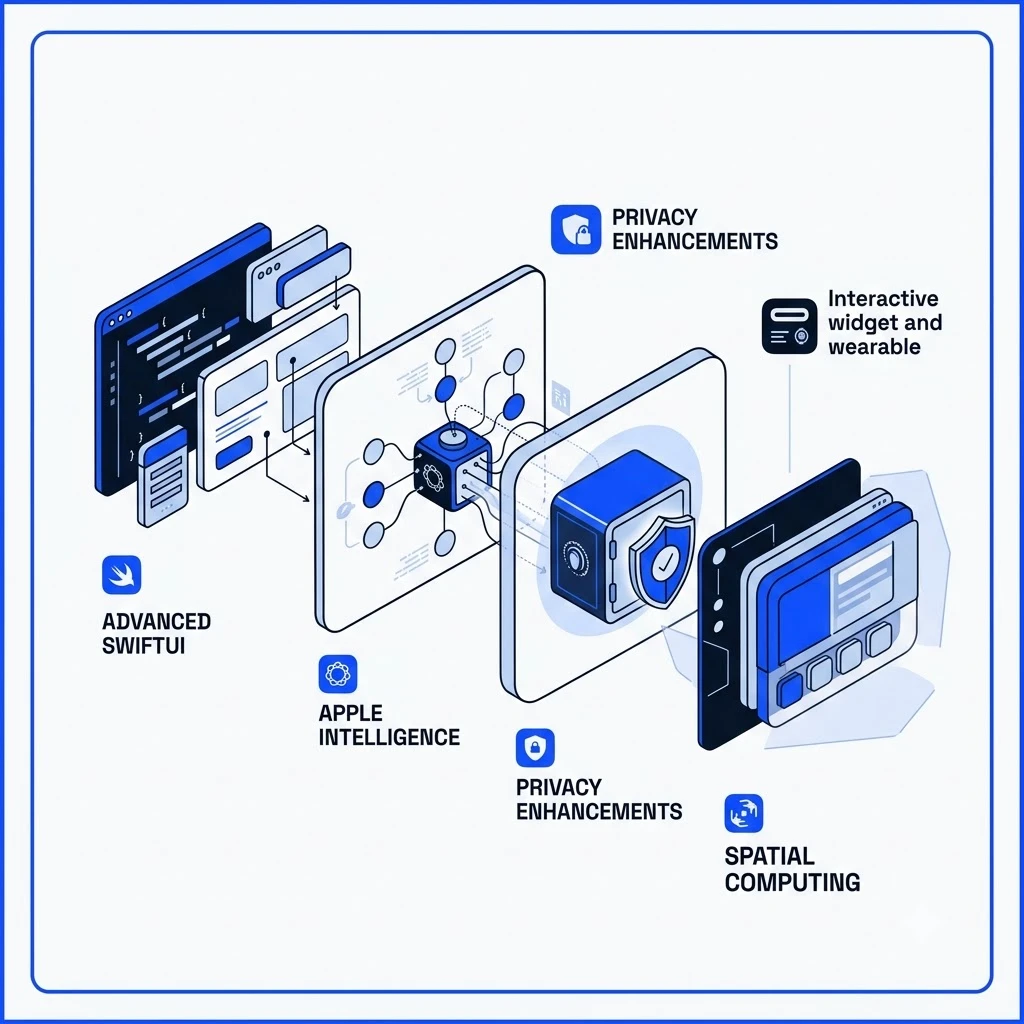
AI integration: Apple Intelligence
Apple is deeply integrating artificial intelligence across its ecosystem with Apple Intelligence. This brings advanced AI capabilities directly to devices, enabling smarter features like enhanced Siri, intelligent automation, and context-aware assistance. Developers can leverage frameworks like Core ML to build machine learning models that run efficiently on-device, ensuring faster performance and greater user privacy. This shift means apps will increasingly be expected to understand user context and adapt to personal behaviors.
Spatial computing and visionOS
The introduction of Apple Vision Pro and visionOS opens up a new frontier in spatial computing. Developers can now create immersive 3D experiences that blend digital content with the physical world. This technology has the potential to revolutionize industries like design, education, and entertainment by offering entirely new ways for users to interact with information and applications. Exploring development for visionOS allows for the creation of groundbreaking user interfaces and interactions.
Advanced SwiftUI and declarative UI
SwiftUI continues to evolve, offering developers more powerful tools for building modern, declarative user interfaces. Its state-driven development patterns simplify complex UI management and promote code reusability across Apple platforms. Advanced SwiftUI capabilities now include tighter animation control, seamless integration with UIKit, and improved layout performance for complex data lists. As SwiftUI matures, it becomes an essential choice for creating visually appealing and highly responsive applications that adhere to Apple’s design principles.
Privacy enhancements
Apple remains committed to user privacy, introducing stricter data collection rules and prominent App Tracking Transparency (ATT) prompts. Privacy enhancements require strict adherence to data minimization, secure local data storage, and transparent permission requests. Developers must prioritize robust data protection measures and transparent communication with users about data usage. Building trust through strong privacy practices is becoming a key differentiator for successful applications, especially those handling sensitive information.
Interactive widgets and wearables
The functionality of iOS apps extends beyond the main interface with interactive widgets and the watchOS platform. Home screen widgets are becoming more capable, allowing users to perform actions directly without opening the app. Furthermore, developing independent watchOS apps offers opportunities to create tailored experiences for the Apple Watch, enhancing user engagement and providing convenient access to app features on a wearable device. This expansion allows for more accessible and integrated user experiences.
Choosing Your iOS Development Partner
Deciding whether to build your iOS application in-house or outsource is a significant strategic choice. Each approach presents distinct advantages and disadvantages that impact control, cost, speed, and access to expertise. Understanding these trade-offs is crucial for aligning your development strategy with business objectives.
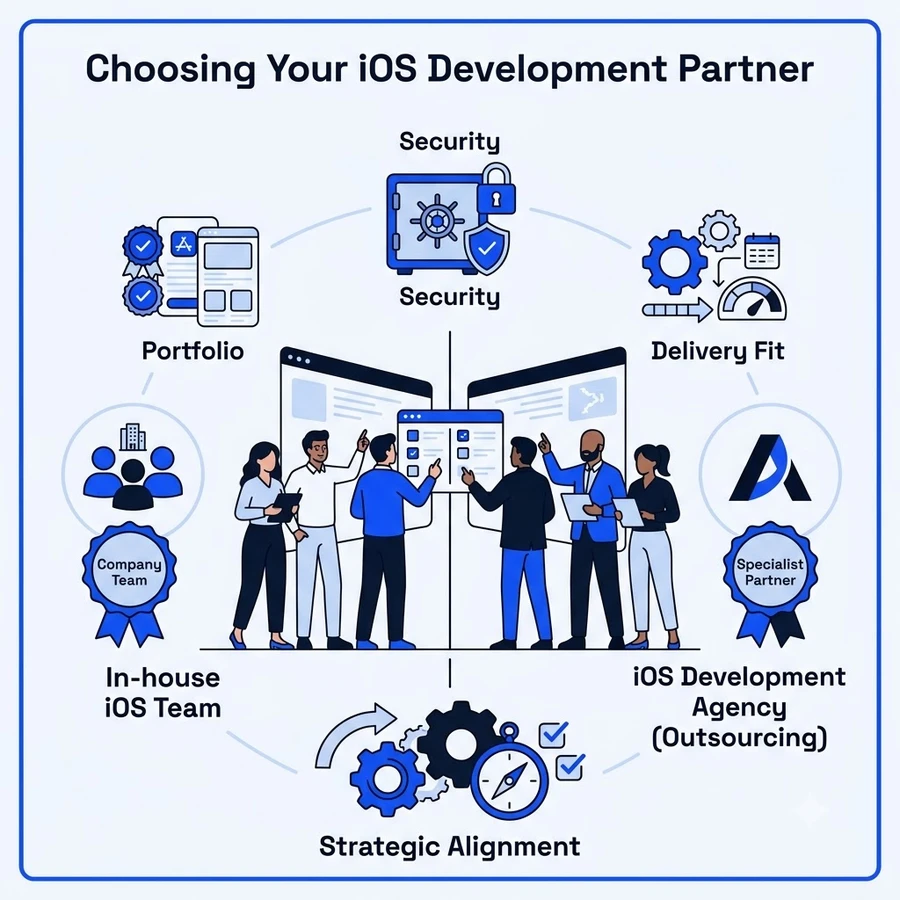
In-house vs. Outsourcing: Decision Criteria
Building an application entirely in-house offers maximum control over the product roadmap and intellectual property. Your team develops deep product knowledge, fostering a strong sense of ownership. However, this path demands substantial investment in recruitment, training, and ongoing overhead. Scaling an in-house team quickly to meet project demands can also prove challenging.
Outsourcing to a specialized ios app development company provides access to a wider pool of talent and established expertise. This can accelerate time-to-market and offer greater flexibility. Agencies often have experience across various industries and technologies, bringing valuable insights. The key challenge lies in effective vendor management and ensuring clear communication channels to maintain alignment with your vision. Freelancers can be a cost-effective option for specific tasks or smaller projects, but they may lack the cohesive team structure and scalability of an agency.
Key Criteria for Selecting an iOS Development Agency
When selecting an enterprise ios app development agency, several factors warrant careful consideration. Technical proficiency is paramount; look for a proven track record with Swift, SwiftUI, and relevant Apple frameworks. Review their portfolio and case studies to assess the quality and success of past projects. An agency’s adoption of an agile development process indicates adaptability and an efficient workflow, crucial for iterative development.
Transparent communication and clear reporting mechanisms are vital for maintaining project visibility and trust. The agency should demonstrate a genuine understanding of your business goals, ensuring their technical solutions directly support your objectives. Finally, inquire about their security practices and compliance standards, such as ISO 27001, especially if your app handles sensitive data. Many businesses choose to hire ios app developers from agencies that excel in these areas to ensure a robust and successful product launch.
Frequently Asked Questions (FAQs)
How long does it typically take to develop an iOS app?
The timeline for iOS app development varies significantly based on product scope and backend complexity. A standard application with common features takes between 3 to 9 months to move from ideation to App Store deployment. Highly complex enterprise solutions require structured engineering roadmaps that span a year or more.
What is the difference between native and cross-platform development?
Native development relies on the swift programming language and the xcode ide to maximize platform performance across the Apple ecosystem. Cross-platform frameworks use shared codebases to target multiple operating systems simultaneously.
The primary options break down across these core technical vectors:
| Approach | Primary Tech Stack | Performance Level | Ideal Use Case |
|---|---|---|---|
| Native iOS | Swift, SwiftUI, UIKit | Maximum hardware access | High-performance apps, heavy animations |
| Cross-Platform | React Native, Flutter | Near-native | MVP validation, content-heavy apps |
| Hybrid | HTML5, CSS, JavaScript | Moderate | Basic web wrappers, simple catalogs |
Our mobile app development services help product leaders select the right technical foundation for their goals.
Do I need a Mac to develop iOS apps?
A Mac computer running macOS is mandatory for professional iOS app development. Developers must use Xcode for writing code, UI prototyping, and local simulator testing. Furthermore, deploying applications to real devices requires an active Apple Developer Program membership to manage signing certificates and provisioning profiles.
How much does it typically cost to develop an iOS app?
Development expenses fluctuate based on feature depth, UI complexity, and geographic labor markets. According to the Appinventiv cost guide, standard US builds range from $60,000 to $250,000. Regional labor expenses shape overall budgets, with specialized US engineering talent commanding hourly rates between $60 and $120.
What are the latest trends in iOS development?
Modern iOS engineering centers on artificial intelligence integration, advanced UI paradigms, and strict data privacy compliance. Key technological shifts include:
- Apple Intelligence: On-device machine learning models powering smarter automation and contextual user interactions.
- SwiftUI Framework: Declarative interface design replacing legacy UIKit workflows for faster multi-device layout scaling.
- Spatial Computing: visionOS development expanding immersive digital products beyond traditional flat screens.